 components
Components, Location & Rights
Infrastructure - Email and FTP
PDF Printing
Client Server Database Engine
Licencing: Local or Dongle [Aladdin HASP]
TDOC is a scalable application. Its components may be installed all together on the same PC for local operation, or on a server(s) for network operation whether using a LAN or WAN (via a VPN). Installation is from one of the following:
| Component | Location | Rights | Notes |
| Software | On User's PC | Read, Write, Create, Delete | All users require to be able to read and write to the TDOC.INI file which holds user settings, and to be able to write Error Logs should an unforeseen event occur. |
| Licence | "Per seat" | [As software] | The licence is held in a text file which resides in the software directory. |
| "Per seat" | The licence is held in a Dongle connected to the users PC. | ||
| "Concurrent" | The licence is held in a Dongle connected to a Server, with a Licence Manager. | ||
| Report Layouts | Read | Users of the System Utilities need full rights to modify the report layouts. | |
| Database | Accessible to all Users | Read, Write, Create, Delete | All users require to be able to write to the User Log. The location is known as a Data Directory. |
| Temporary Documents | On User's PC | Read, Write, Create, Delete | Must be for the exclusive use of the user. The location is known as the Spool File Directory. |
| Quarantined Documents | On User's PC | Read, Write, Create, Delete | Must be for the exclusive use of the user. The location is known as the Incoming Directory |
| Associated Documents | Accessible to all Users | Read, Write, Create, Delete | Document Control and User Actions modules. If TDOC's inbuilt EDM mechanism is enabled, the directories where documents reside are known as Nominated Directories. |
| Read | Reports & Enquiries module. |
Infrastructure - Email and FTP
TDOC supports the sending of Email in one of three ways:
TDOC does not have the facility to import email from any other system as it is quicker to cut and paste the information into the relevant registration screen. If the email contains EDI information then this is saved into the Incoming Directory where documents etc are quarantined until registered, inspected, until imported and automatically transferred to a nominated directory.
TDOC supports FTP for the transmission of technical documents being sent under cover of a transmittal, and to a reprographics house with a print order. An email is generated to which are attached the transmittal documents or print order, and the unique link to the FTP location is included allowing the recipient to download the zip file using HTTP.
Once email has been enabled, TDOC supports EDI using HTML forms - as described in How TDOC Works, About EDI
TDOC requires the installation and configuration of PDF995 to enable generation of PDF documents. The powerful report generator (ReportPro) embedded into TDOC has a basic PDF capability, but this is inadequate for the needs of the complex reports which TDOC has.
PDF995 is available from PDF995.com from where it can be downloaded. It is recommended that the product be purchased.
To configure PDF995, add the following into the Parameters Section of the PDF995.ini file.
[Parameters]
Quiet=0
Autolaunch=0
Output Folder="C:\TDOC5\Spools"
Output File=SAMEASDOCUMENT
To configure TDOC
TDOC uses the Advantage Client Server Engine (ADS). This is available in two forms:
The Advantage Client Server Engine should be configured. For a typical project setup of one document controller and five other users, the following maximum values are suggested. There is no substitute to reading the Help file, and doing one's own calculations. The settings are made on the server as follows:
components
| Item | Suggested Value |
Calculation |
| From the Configuration Utility tab, Database Settings subtab | ||
| Number of Connections | 10 | The greater of twice the total number of TDOC licenced modules, or twice the number of Client Server Engine Concurrent Users. This is optimised for two TDOC applications running per use of TDOC modules. |
| Number of Work Areas | 400 | 150 times number of document controllers plus 50 times number of other users. One work area is needed for each table in the database opened by each user. The same table may be opened several times by each user. |
| Number of Tables | 400 | Equal to the number of Work Areas |
| Number of Indexes | 400 | Equal to the number of Tables |
| Number of Data Locks | 2500 | Allows for twenty five activities per connection, average ten tables per activity. |
| From the Configuration Utility tab, Misc Settings subtab | ||
| Number of Worker Threads | 20 | Allow for twice the number of connections. |
| If internet connections are required, from the Communications subtab | ||
| LAN Port | 2010 | This is the default. A value of "0" disables IP connections |
| IP Port | 2068 | This is the default, and the router MUST forward this port to the Server |
| Other Items: | A data dictionary is required, and must be
created using the Advantage Data Architect, in each data directory. Each data directory must be Shared with SYSTEM The path to the data dictionary must be defined using the UNC Convention, and internet access enabled. Advantage Database Users must be created and given Internet Access The Advantage Extended Procedures must be added to the Data Dictionary. |
|
The Advantage Data Architect should be used at least weekly to check that the settings that have been made are adequate. This is done as follows:
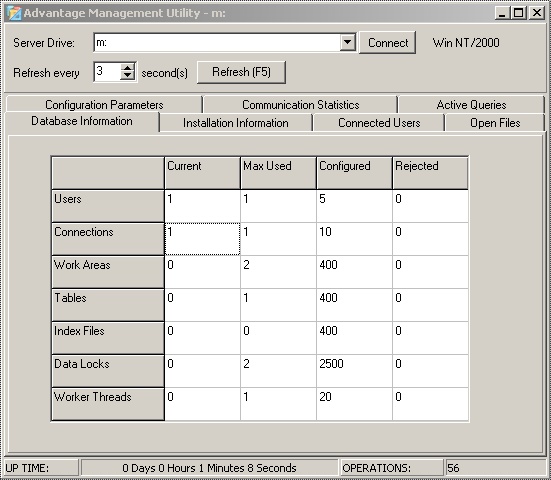 components components
Licencing: Local or Dongle [Aladdin HASP]
There are two modes by which TDOC can be licenced:
Local Licence
 components
Local Dongle
Multi User Dongle components components